Synchronous vs Asynchronous JavaScript
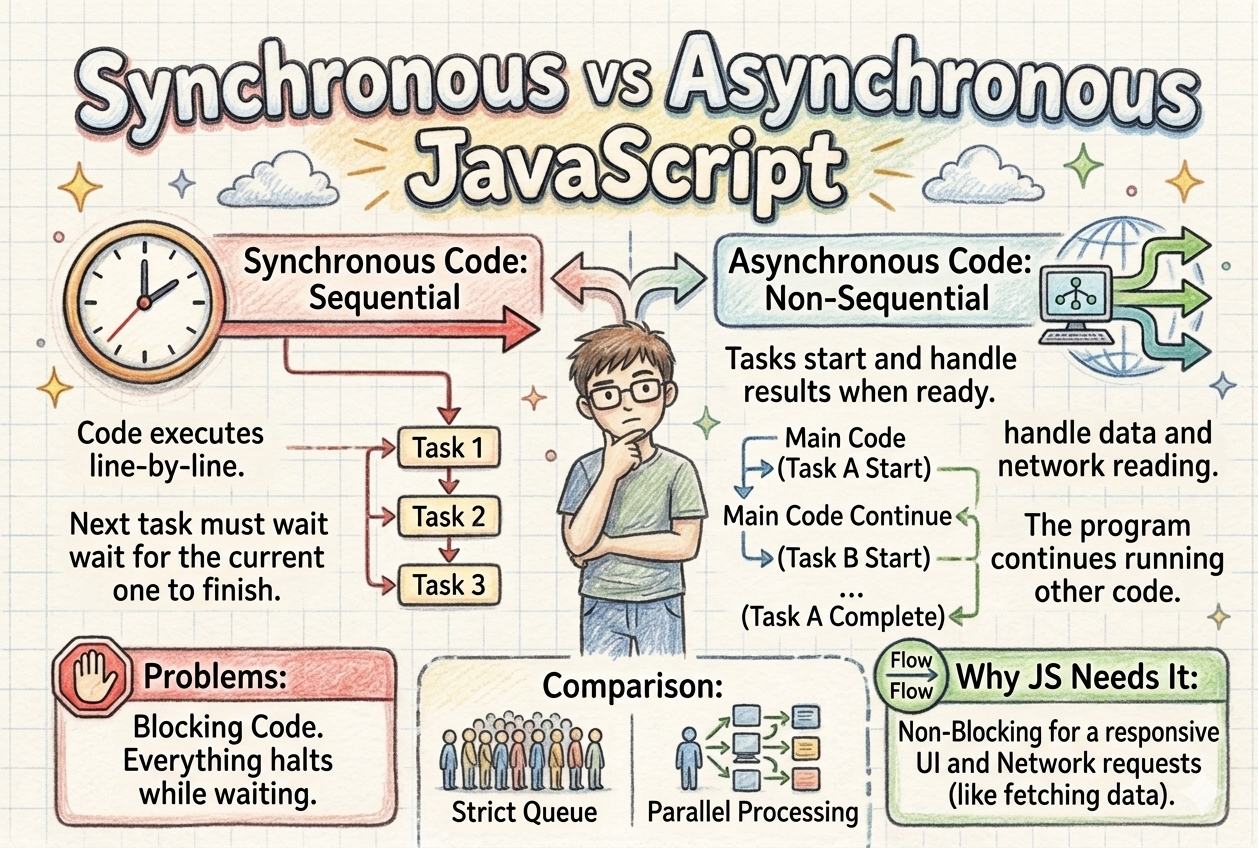
JavaScript is a single threaded language that executes code line by line, from top to bottom, which is known as synchronous behavior. However, JavaScript can handle asynchronous operations using runtime features like Web APIs and the event loop.
First, let’s understand what synchronous code looks like.
function add(a, b) {
  return a + b;
}

console.log("Start");

console.log(add(2, 3));

console.log("End");

// Output:
// Start
// 5
// End
As you can see, the code executes line by line and prints the result. This is how normal synchronous code works.
However, problems arise when dealing with tasks like API calls or timers. These operations can take time, and handling them synchronously would block the execution of the entire program.
To solve this, JavaScript uses asynchronous behavior. Instead of blocking the main thread, tasks like API calls and timers are handled by the runtime (Web APIs), and their results are processed later using callbacks, promises, or async/await.
That’s why asynchronous behavior and promises exist in JavaScript.
What synchronous code means
Synchronous code means executing code line by line, sequentially, from top to bottom. Each line waits for the previous one to complete before running. This ensures that the code executes in the exact order it is written.
Example:
console.log('Start'); // This will run first
console.log('Hello World'); // This will run second
console.log('Finish'); // This will run third
If there is a task that takes time, like a heavy loop, the application has to wait for it to complete, which blocks further execution. you can see the code example below:
console.log('Start');
for (let i = 0; i < 10000000; i++) {
   console.log("Number is", i)
}
console.log('End');
What asynchronous code means
Asynchronous code allows JavaScript to start a task but not wait for it to complete before moving on to the next one. JavaScript can continue executing other tasks and come back to the asynchronous task once it's done.
JavaScript is a single-threaded language, which means it can execute only one task at a time using a single call stack.
However, time consuming tasks like API calls, database queries or file operations are handled outside the main thread by the runtime (Web APIs in browsers or libuv in Node.js).
Once these tasks are completed, their callbacks are placed in the task queue. The event loop continuously checks the call stack, and when it’s empty, it pushes tasks from the queue into the stack for execution.
This is how JavaScript handles asynchronous operations without blocking the main thread.
console.log("Start");

setTimeout(() => {
  console.log("Async Task Done");
}, 2000);

console.log("End");

/*
Output:
Start
End
Async Task Done
*/
Why JavaScript needs asynchronous behavior
JavaScript needs asynchronous behavior because if all time consuming tasks such as API calls, database queries, or file operations were executed synchronously, they would run one by one and block the main thread.
This would delay the execution of other code and lead to slower response times, negatively affecting the user experience.
By using asynchronous behavior, these tasks are handled outside the main thread, allowing the application to remain responsive while the operations complete in the background.
Problems that occur with blocking code
Now let’s discuss the major problems with blocking code. We’ve already covered the main reason, but now let’s understand it more precisely.
UI freeze (browser):
In GUI applications, running blocking code on the main thread (UI thread) will freeze the application. The user cannot interact with the program until the operation finishes.Resource Inefficiency (Idle Threads):
Blocking operations keep threads occupied even while they are doing nothing but waiting. This wastes memory and CPU resources, as those threads cannot be used for other, active tasks.Scaling and Bottleneck Issues:
In high-concurrency environments (e.g., web servers), if all available threads are blocked waiting for I/O, the server cannot accept new requests. This leads to a bottleneck, poor performance under load, and potentially service outages.Low Throughput and System Sluggishness:
Because the thread cannot perform other tasks while waiting for I/O (like reading a file or making a network call), the overall efficiency is reduced, resulting in a sluggish application.
Conclusion
In JavaScript, asynchronous code is not always better than synchronous code both have their own use cases.
Synchronous code is useful when you need strict execution order or when tasks are simple and do not involve API calls or database operations.
On the other hand, when dealing with time-consuming operations like API calls or database queries, asynchronous code should be used to prevent blocking and avoid delays.
Choose based on the nature of the task, not preference.


