Blocking vs Non-Blocking Code in Node.js
Introduction
As we know, Node.js operates on a single thread, meaning each line of code is executed sequentially by that thread.
This code can include various types of tasks such as import statements, console.log(), mathematical computations, database queries, file reading, and more.
Some of these tasks are time-consuming, while others execute quickly. As developers, our goal is to build scalable and robust applications.
Therefore, it is essential to understand blocking and non-blocking code specifically when and where to use each. Overusing blocking operations can significantly slow down the application.
In this article, we will explore these concepts in detail.
What Blocking Code Means?
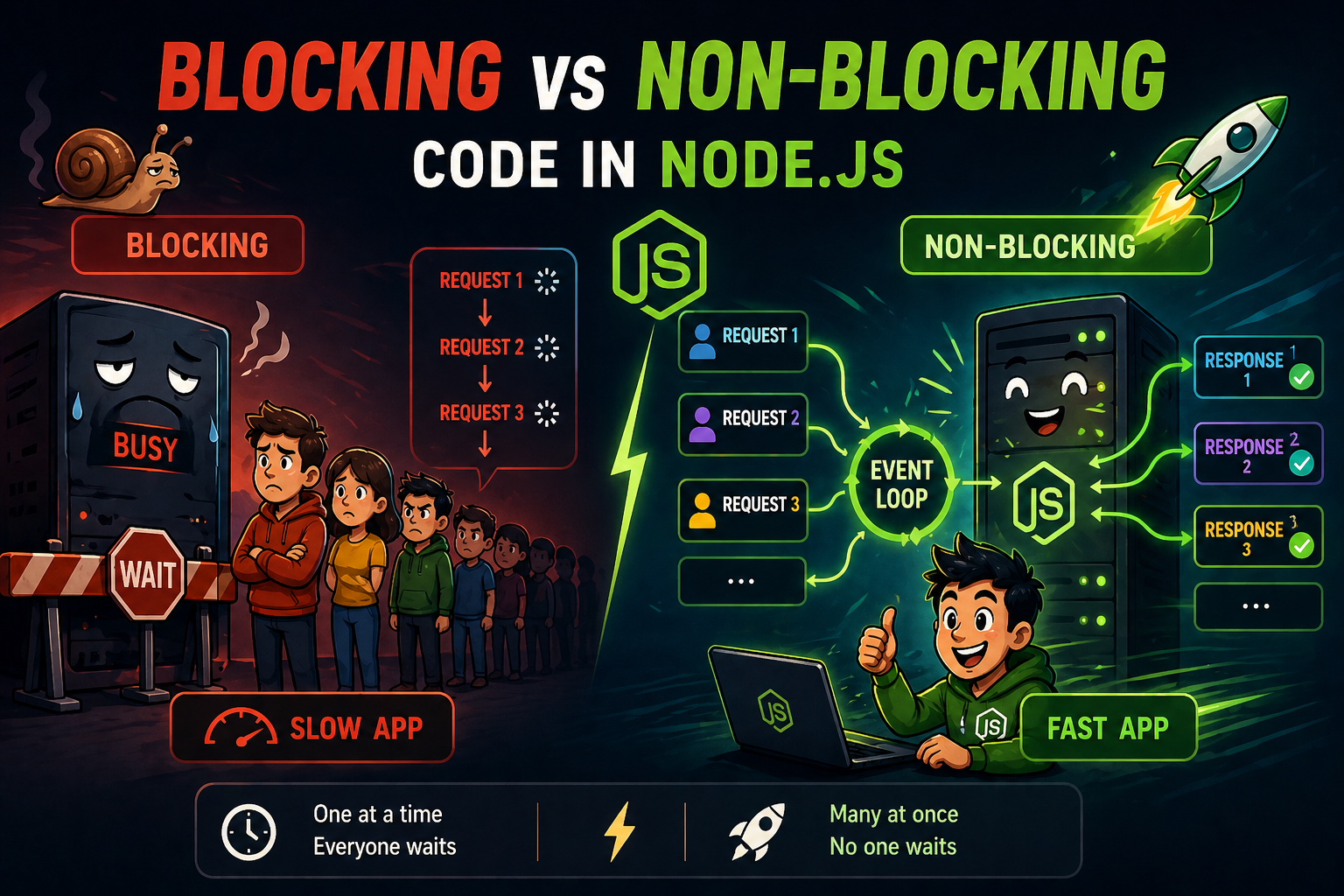
Blocking code refers to a portion of code that prevents further JavaScript execution until it completes.
Since Node.js is single-threaded, a blocking operation halts the Event Loop, stopping it from handling other incoming requests. As a result, the entire application becomes unresponsive until that task finishes.
While the main thread is busy executing a blocking task, it cannot accept or process other requests. This leads to slower performance and a poor user experience.
Analogy:
Imagine a waiter who takes an order, goes to the kitchen, and waits there until the dish is ready. During this time, the waiter doesn’t attend to other customers, causing delays for everyone else.
const fs = require('fs');

console.log('1. Start');

const data = fs.readFileSync('file.txt');

console.log('2. File read finished');
console.log('3. End');
In the above code example readFileSync is blocking code which is pausing the execution until the file read.
What Non-Blocking Code Means?
Non-Blocking Code refers to operations that do not halt the execution of additional JavaScript while waiting for a task to complete.
Because Node.js is single-threaded, it uses this model to handle multiple concurrent tasks without needing to spawn a new thread for every request.
Non-Blocking code has a complete process:
Asynchronous Execution: Non-blocking operations are typically asynchronous. Instead of waiting for a result (like a file being read), the program initiates the task, delegates it to the system or a background pool, and immediately moves to the next line of code.
Immediate Return: A non-blocking function returns control to the Node.js Event Loop almost immediately.
Callbacks and Promises: Once the background task is finished, it notifies the main thread by placing a callback function in the task queue to be executed when the call stack is empty
Analogy:
A waiter takes an order, passes it to the chef, and immediately moves to the next customer. When the dish is ready, the chef notifies the waiter, who then serves it without making others wait.
const fs = require('fs');

console.log('1. Start');

fs.readFile('file.txt', (err, data) => {
    if (err) throw err;
    console.log('3. File read finished (callback)');
});

console.log('2. End');
Now in this code example readFile is non-blocking function starts the task in the background and moves to the next line immediately.
Why Blocking Slows Servers?
As we know, Node.js runs on a single thread. If a blocking operation occurs, it prevents further code execution until it finishes. During this time, any incoming web requests are not processed because the main thread is occupied with the current task.
If the code contains too many blocking operations, it can slow down the entire application, degrade responsiveness, and negatively impact the user experience.
When we use synchronous (blocking) code, it pauses the Event Loop—the core mechanism that drives Node.js.
Since only one task can run at a time, excessive blocking eliminates concurrency, which is the primary strength of Node.js.
Async Operations in Node.js
Async operations are non blocking operations which doesn't block the further code exccution. it uses an asynchronous, non-blocking model to handle multiple tasks simultaneously without waiting for each one to finish before starting the next.
It is all posible because of event loop.
Event Loop
The Node.js Event Loop is the heart of async processing. It operates on a single thread, delegating heavy I/O operations to the system's kernel or a pool of worker threads (via the libuv library) and then executing callbacks once those tasks complete.
Node.js has evolved through several patterns to manage asynchronous flow:
Callbacks
The original method where a function is passed as an argument and executed after a task finishes.
But it has issue which is deeply nested callbacks can lead to "Callback Hell," making code hard to read and debug.
Promises
Just like our real life promises, Introduced in ES6, Promises represent the eventual completion (or failure) of an operation. They allow for cleaner chaining using .then() and .catch()
Async/Await:
Syntactic sugar built on top of Promises that allows you to write asynchronous code that looks and behaves like synchronous code. Use the async keyword to define a function and await,
And always remember an async function alwats returns a Promise So we will need to handle it.
Conclusion
The use of blocking and non-blocking code depends on the specific use case, so understanding these concepts is essential.
When applied correctly, they ensure your application remains efficient, scalable, and serves its intended purpose.
In the beginning, many developers struggle with these concepts, but mastering them can significantly improve your problem-solving skills and overall engineering growth.
Hope you found this blog helpful❤️


